CA Workspace Function - Introduction
In a bank, financial institution or organisation that offers financing solutions to the public, it is very crucial to have a system that contains all the necessary features for efficient credit processing.
This CA Workspace function allows the logon user to do these, during the credit application processing time:-
-
To pick up credit applications assigned for further actions.
-
To maintain details of credit application that comprises the following details:-
-
Applicant (for main-holder)
-
Product or credit facility
-
Guarantors
-
Required application supporting documents.
-
-
To detect and reduce any duplicated records of customer or application, based on certain retrieved applications' summaries, e.g., existing customer, has existing application(s), has ongoing application(s), or previous application(s).
-
To compute the expected repayment amount that is payable on each repayment period
-
To perform the required customer verification events (e.g., Internal Blacklist Check) on each application.
-
To work on, monitor and track the possible high volumes of credit applications assigned for processing.
-
To have an overview of the number of application tasks that are pending for action(s) in various application workflow stages, including the list of applications grouped by the respective pending workflow stage’s task card.
-
To view each credit application’s processing movement for easy follow-up and enquiry.
-
To view credit facility details and its related terms and conditions.
All the possible task cards that can be displayed in this function, are as follows:-
-
New Application (To initiate new application and commence data input in this CA Workspace function)
-
Next Assist (To pick up the assistance requested credit application)?
-
Application Workflow Stage and Task Cards:-
-
My Draft (First stage of each credit application, from New Application)
-
Credit Check
-
Credit Reco (This is an optional workflow stage, which is configurable)
-
Credit Approval
-
Customer Decision (Last stage of each credit application in the credit processing process)
-
Through the 'New Application' task card, user will be able to create 'fresh' application.
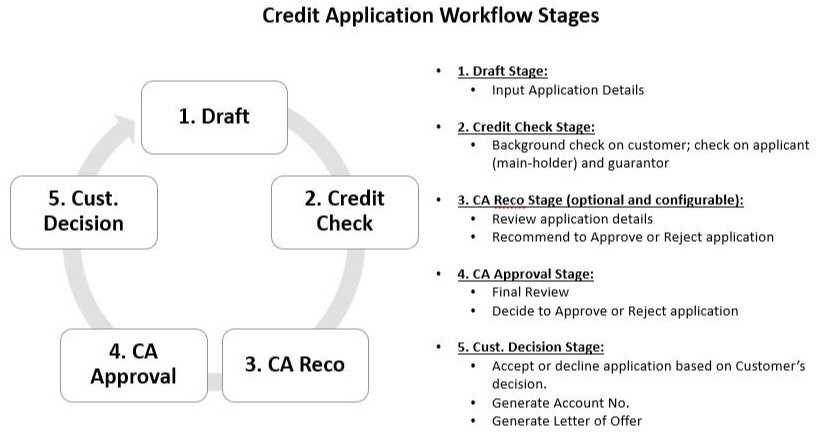
The purposes of the respective application processing workflow stages are summarised, as follows:-
-
Draft workflow stage (under the 'My Draft' task card):
-
Comprises applications that have been created by, or assigned to the logon user either for viewing or further data input relating to newly created application within this 'CA Workspace' function.
-
This stage involves inputting, or updating data, or uploading documents under the applications parked under the 'New Application' task card.
-
Each newly saved credit application will be parked at this stage, immediately. The credit application will stay at this stage as long as the credit application has not been submitted.
-
-
Credit Check Workflow Stage or Task Card:
-
This stage allows user to perform the followings:-
-
Compute the applied credit facility’s repayment amount at each repayment period.
-
Customer background verification’s events, e.g., internal blacklist.
-
-
-
Credit Reco Workflow Stage or Task Card:
-
This stage is optional and will only appear, provided the 'Credit Reco' credit processing workflow stage (is pre-maintained to be applicable at the 'Workflow Setup' function), for use at this 'CA Workspace' function.
-
This stage involves credit recommender(s) to do the followings:-
-
Review the data inputted in the application
-
Perform review based on:-
-
Credit scoring result and deviation outcome
-
Internal Blacklist finding outcome
-
Other information provided by the applicants (main-holder) or guarantor, to determine his eligibility to the credit facility applied.
-
-
-
During this stage, the credit recommender will need to also decide to do one of the followings:-
-
Recommend to Approve
-
Reject (including reason for the rejection)
-
-
-
Credit Approval Workflow Stage or Task Card:
-
This stage involves the assigned credit approver(s), to do the followings:-
-
To perform final review on the application details
-
To preview and print out agreements (e.g., letter of offer)
-
To either approve, or reject the application, by considering the application details inputted, documents uploaded, and background findings on the applicant(s) and guarantor (s), especially on the financial background, and the computed repayment amount and Gross Effective Yield (GEY) and Net Effective Yield (NEY).
-
-
After each application has been approved, the signing of the related documents or agreements (e.g., Letter of Offer) will be arranged. However, the generation of the documents concerning offer of the approved credit facility or facilities will be dependent on the practice of the respective bank or financial institution.
-
-
Cust. Decision Workflow Stage or Task Card:
-
This stage involves the user to update on the acceptance decision of the applicant’s on the credit facility offered or granted by the financier.
-
During the update on the acceptance decision, user can do these:-
-
Input any remarks concerning the acceptance of the facility contained in the credit application.
-
Confirm the acceptance of the applicant(s) by clicking on the 'Generate Account Number' button, to trigger credit facility’s account number generation, and customer information file creation for customer details inputted directly in this 'CA Workspace' function.
-
-
The overview of the credit application processing workflow stages that are applicable in this 'CA Workspace' function, and described above, are summarised in the diagram, below.